Overview
Nested Company Locations enable several key functions within Manufacton:
- A hierarchical organization of locations which enables a roll-up count of inventory.
- A common location for all of your projects' inventory
- Nested Company Locations do not have any project affiliation
- The ability to more actively and easily manage your inventory within your storage and production facility.
Nested Company Locations work in conjunction with:
- Assembly / Parts Catalog
- Because of the way items in the Nested Company Locations are organized, all items (both Material and Prefab) MUST HAVE A CATALOG ID to all it to be organized properly. This will include:
- All Material Items
- All Assemblies created from the Assembly Catalog
- Production Items not created from the Assembly Catalog are not supported and cannot be shipped into or out of any of the Nested Company Locations.
- Because of the way items in the Nested Company Locations are organized, all items (both Material and Prefab) MUST HAVE A CATALOG ID to all it to be organized properly. This will include:
- Inventory Manager
- Transfer item within the Inventory via Transfer Requests
- Production Manager
- To enable "Pick" Transfer Requests to move materials from a Nested Company Location to a production location.
- Shipping
- To enable "Stock" Transfer Requests to move materials from a delivery into storage or directly to the production floor.
- To enable shipments from the Top-Level of a Nested Company Location to any other Company or Project location
BEFORE IMPLEMENTING

The use of Nested Company Locations fundamentally introduces an additional
function into the workflow called Transfer Requests.  It is important that
you have a designated role who has been trained on fulfilling these requests
prior to rolling out Nested Company Locations.  This role is known by many
names:
 o Stock Person
 o Inventory Manager
 o Milk Runner
 o Picker
 o etc.
Topics
Details
Adding Nested Locations
Nested locations are added through the Locations import function in:
- App & Project Setup
- Company Profile
- Location
- Import Excel
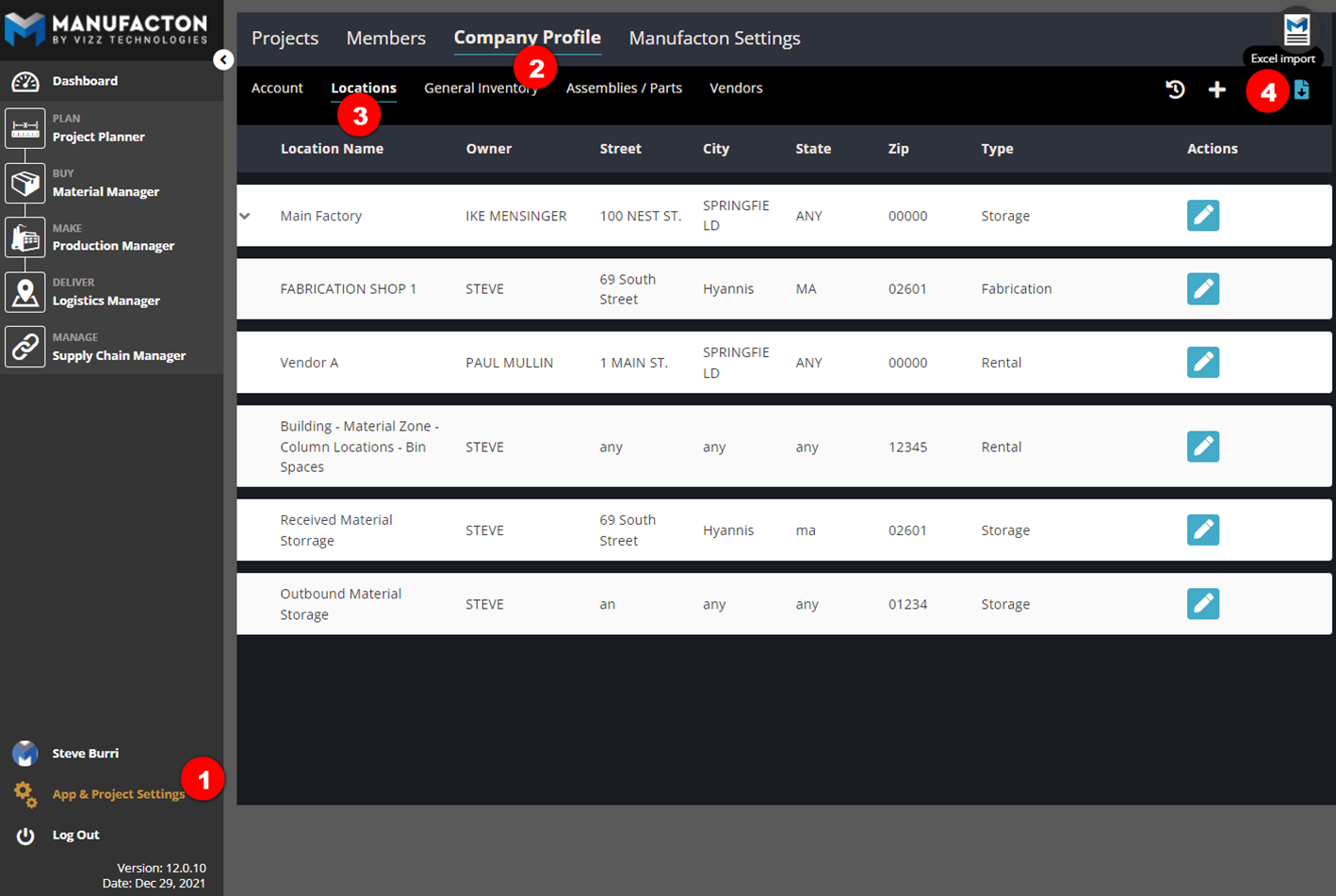
The Import template is available in the Import Templates KB Article.
Notes:
      o Currently, import is the only way to get Nested Company Locations
        into Manufacton.
      o There is no method of modifying or deleting or modifying Nested
        Company Locations, please consider the location hierarchy thoroughly
        before importing.
Nested locations, in general, contain the following:
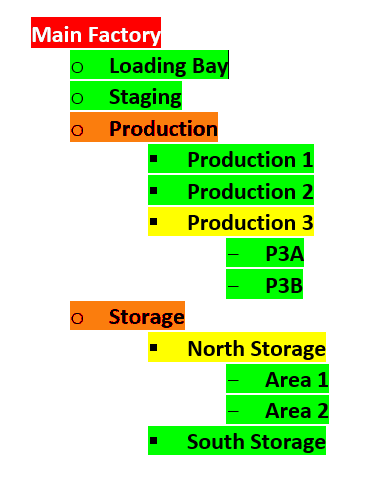
- Top-Level location for the "nest"
- The "Main Factory" is the Top-Level location in this example
Note: Currently, only (1) one Top-Level Location can be defined in Manufacton
- Sub-Locations
- An arbitrary number of sub-locations can be created
- The "depth of the nest" is arbitrary (sub-sub-locations, sub-sub-sub-locations, etc.)
- The "Storage" and "Production" locations represent 2nd level sub-locations (in the example below)
- The "North Storage" and "Production 3" locations represent 3rd level sub-locations (in the example below)
- Items can be stored in Sub-Locations - if Items are stored in any Sub-Location, a Terminating Location called "<sub-location-name>-General Storage" will automatically be created by the system
- Terminating Locations
- The last location on a row is the Terminating Location and represents the deepest locations within a sub-locations nest that items can be stored
- "Loading bay", "Staging", "Area 1", "Area 2", "Production 1", "Production 2", "P3A", and "P3B" are all Terminating Locations (in the example below)
Note: Up to 1024 rows of Nested Company Locations can be imported in total.
Example
Below is an example of nested company locations. This nest was imported with the excel template as shown.
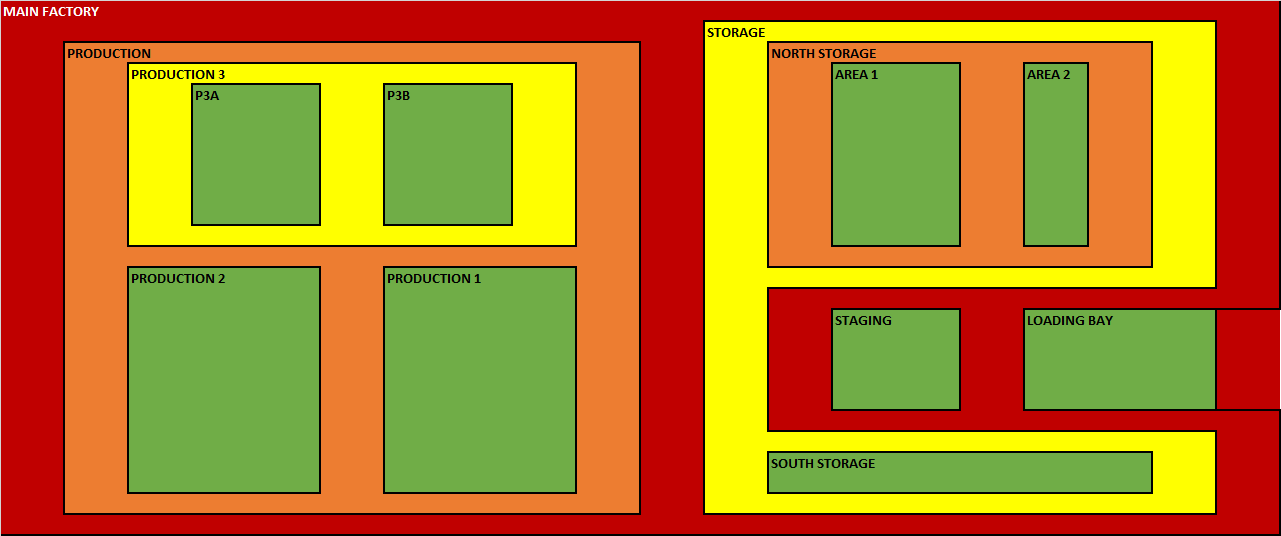
In this example, the Loading Bay, Staging, Production, and Storage locations all are sub-sets of the Main Factory. North Storage and South Storage are both sub-sets of Storage, etc.
Physically, a factory with the above Nested Company Locations might look like this:
Using Nested Company Locations
Once Nested Company Locations have been imported, they can be leveraged for storing items in a hierarchical and relational structure. These location types have been primarily created for enterprises that need to actively manage the raw materials that make-up their prefabs; both in storing those materials and in providing those materials to their production line.
For Managing Storage
- See the KB Article on Inventory Manager for more details on this topic.
For Supplying Production Orders with their Materials
- See the KB Article on Transfer Requests for more details on this topic.
With Shipping
- See the KB Article on Transfer Requests for more details on this topic.
Comments
0 comments
Please sign in to leave a comment.