Overview
Occasionally, out of date data gets stored in your browsers "local storage" cache which can adversely affect how ManufactOn behaves.
This most commonly happens after an update to the software and can result in things like missing columns or scroll-bars, new features not being available, etc.
Clearing your browser cache
To solve this, the following steps can be taken:
- Make sure you are using a supported browser - See Does the Internet Browser Matter?
- Select the "Secure" icon in the browsers headers
- Select "Cookies" from the Secure connection drop-down
- Select the "app.manufacton.com" "Local Storage", "Session Storage" and "Cookies"
- Click the "Remove" button
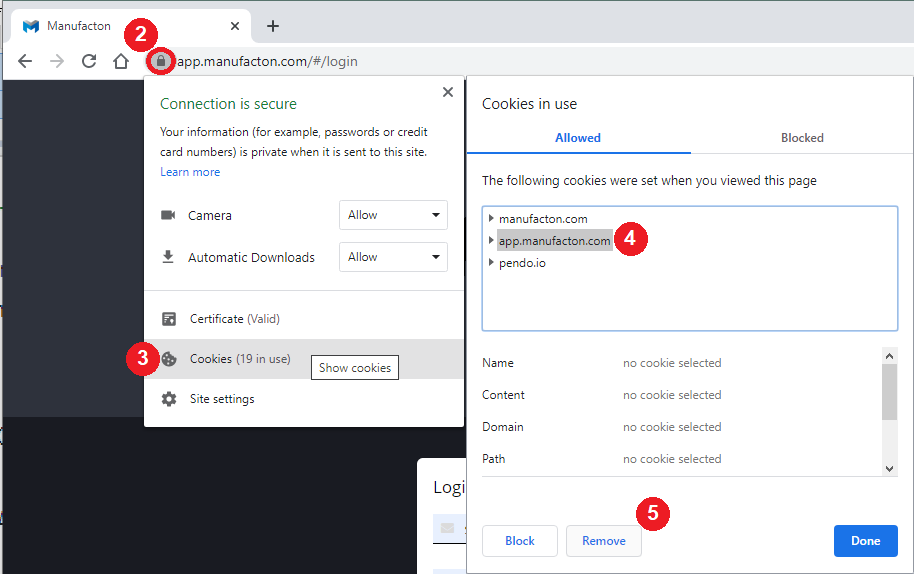
The above image is for Chrome - for other browser types see the following links.
Note:  Clearing the cache will reset any perferences you may have set for
       Manufacton back to their defaults such as:
         - Columns selected
         - Filters
         - etc.
Comments
0 comments
Please sign in to leave a comment.